A step-by-step guide to running Qwen 3.6 27B locally on a 24GB GPU using Podman, NVIDIA CDI GPU passthrough, and llama.cpp model presets.
Hardware and Software Setup
Hardware:
- CPU: AMD Ryzen 9 5950X (16 cores)
- RAM: 64 GB DDR4
- GPU 1: NVIDIA RTX 3090 (24GB VRAM) - Primary inference device
- GPU 2: NVIDIA GTX 1070 Ti (8GB VRAM) - Not used in this test
Software:
- OS: Fedora 44 Workstation
- podman 5.8.2
- NVIDIA driver version: 580.159.03 (using this version to maintain support for 1070 Ti; newer drivers drop legacy architecture support)
- NVIDIA Container Toolkit 1.19.0
- Container image:
ghcr.io/ggml-org/llama.cpp:full-cuda(CUDA 12 - based image) - llama.cpp version: 9309 (6d57c26ef)
- Model: Qwen 3.6 27B - Unsloth GGUF UD-Q4_K_XL quantization
Qwen 3.6
Qwen 3.6 is an open-weight LLM from Alibaba. The 27B parameter variant fits on a 24GB consumer GPU and handles tool calling, coding, and reasoning tasks proficiently. Running it locally keeps your data on your machine.
llama.cpp
The most widely used open-source inference library for GGUF models, written in C/C++, actively maintained. It is used by popular frontends like Ollama and LM Studio. The official container image supports CUDA out of the box. Compared to using Ollama directly, this llama.cpp on Podman setup gives you finer control over KV cache type, batch size, and model presets, at the cost of a bit more manual configuration.
Podman
I use Podman instead of Docker for its rootless default, daemon-less architecture, and systemd integration via Quadlet units.
GPU passthrough with NVIDIA CDI
NVIDIA recommends using the Container Device Interface (CDI) for GPU access in containers. CDI simplifies device passthrough, offering better compatibility with modern Podman workflows, including rootless setups and fine-grained device selection.
Prerequisites:
- Ensure NVIDIA drivers are installed and
nvidia-smifunctions correctly. - Install the NVIDIA Container Toolkit.
# Add the NVIDIA Container Toolkit repository
curl -s -L https://nvidia.github.io/libnvidia-container/stable/rpm/nvidia-container-toolkit.repo | \
  sudo tee /etc/yum.repos.d/nvidia-container-toolkit.repo

# Install the toolkit (Version 1.19.0)
export NVIDIA_CONTAINER_TOOLKIT_VERSION=1.19.0-1
sudo dnf install -y \
    nvidia-container-toolkit-${NVIDIA_CONTAINER_TOOLKIT_VERSION} \
    nvidia-container-toolkit-base-${NVIDIA_CONTAINER_TOOLKIT_VERSION} \
    libnvidia-container-tools-${NVIDIA_CONTAINER_TOOLKIT_VERSION} \
    libnvidia-container1-${NVIDIA_CONTAINER_TOOLKIT_VERSION}
Starting with NVIDIA Container Toolkit v1.18.0, the CDI specification is automatically generated and updated by the nvidia-cdi-refresh systemd service. This service generates the CDI specification at /var/run/cdi/nvidia.yaml when:
- The NVIDIA Container Toolkit is installed or upgraded
- The NVIDIA GPU drivers are installed or upgraded
- The system reboots
This ensures the CDI specifications stay current with the installed drivers and devices, making CDI Devices available for use with container engines like Podman.
To list the available CDI Devices, run:
$ nvidia-ctk cdi list
INFO[0000] Found 5 CDI devices
nvidia.com/gpu=0
nvidia.com/gpu=1
nvidia.com/gpu=GPU-38125bdc-f63a-09b2-bce7-b35c0f95d12c
nvidia.com/gpu=GPU-797ee00e-48ea-2830-1220-fef25cf6e475
nvidia.com/gpu=all
In Fedora, with SELinux, to allow containers to use GPU devices, you may need to run:
sudo setsebool -P container_use_devices true
Finally, to verify that everything works correctly: run nvidia-smi inside an NVIDIA CUDA container
$ podman run --rm --device nvidia.com/gpu=all docker.io/nvidia/cuda:13.2.1-base-opensuse15 nvidia-smi
Tue May 26 14:09:41 2026
+-----------------------------------------------------------------------------------------+
| NVIDIA-SMI 580.159.03             Driver Version: 580.159.03     CUDA Version: 13.2     |
+-----------------------------------------+------------------------+----------------------+
| GPU  Name                 Persistence-M | Bus-Id          Disp.A | Volatile Uncorr. ECC |
| Fan  Temp   Perf          Pwr:Usage/Cap |           Memory-Usage | GPU-Util  Compute M. |
|                                         |                        |               MIG M. |
|=========================================+========================+======================|
|   0  NVIDIA GeForce RTX 3090        Off |   00000000:0D:00.0  On |                  N/A |
| 45%   55C    P8             47W /  280W |   21866MiB /  24576MiB |      0%      Default |
|                                         |                        |                  N/A |
+-----------------------------------------+------------------------+----------------------+
|   1  NVIDIA GeForce GTX 1070 Ti     Off |   00000000:0E:00.0 Off |                  N/A |
|  0%   47C    P8              5W /  180W |       8MiB /   8192MiB |      0%      Default |
|                                         |                        |                  N/A |
+-----------------------------------------+------------------------+----------------------+

+-----------------------------------------------------------------------------------------+
| Processes:                                                                              |
|  GPU   GI   CI              PID   Type   Process name                        GPU Memory |
|        ID   ID                                                               Usage      |
|=========================================================================================|
|  No running processes found                                                             |
+-----------------------------------------------------------------------------------------+
Download Qwen 3.6 27B from Hugging Face
The UD-Q4_K_XL quantization balances quality and VRAM usage well for 24GB GPUs, making it ideal for local coding, reasoning, and tool-calling workloads. There is also the Qwen 3.6 35B-A3B version, a sparse Mixture of Experts model with 35B total parameters but only 3B active per token. It is faster but requires more VRAM and leaves less space available for context.
Model selection: UD-Q4_K_XL variant quantized by Unsloth. This model leaves enough free VRAM for a large context window: with f16 you can typically reach up to 64K, and with q8 KV cache quantization you can extend it to 128K.
Download the model from Hugging Face, and place the model file in ~/.cache/llama/models/Qwen3.6/Qwen3.6-27B-UD-Q4_K_XL.gguf.
Or you can use the Hugging Face Hub CLI to download the Q4 model together with the projection model:
hf download unsloth/Qwen3.6-27B-GGUF --local-dir ~/.cache/llama/models/Qwen3.6/ --include "*mmproj-BF16*" --include "*UD-Q4_K_XL*"
Running llama.cpp in Podman
We will use the official llama.cpp image, optimized for CUDA 12: ggml-org/llama.cpp:full-cuda. The community around llama.cpp is very active, and new images are released frequently with improvements and bug fixes.
Here is the run command for our setup:
podman run \
  --name llamacpp \
  --device nvidia.com/gpu=all \
  -p 127.0.0.1:8080:8080 \
  -v ~/.cache/llama/models:/models:ro,z \
  ghcr.io/ggml-org/llama.cpp:full-cuda \
  --server \
  --parallel 1 \
  --models-preset /models/presets.ini \
  --flash-attn on \
  --host 0.0.0.0 \
  --port 8080
Key Flags Explained:
--device nvidia.com/gpu=all: Passes all NVIDIA GPUs via CDI specifications.-p 127.0.0.1:8080:8080: Binds the port only to localhost, preventing external access. Router mode (see--models-presetbelow) is experimental and lacks authentication: this setup is meant for local use only.-v ~/.cache/llama/models:/models:ro,z: Mounts the model directory as read-only (ro) and relabels it for SELinux compatibility (z).--parallel 1: Sets the number of concurrent request slots to 1. By default, llama.cpp sets this toauto, which picks a value based on available hardware (on my machine, 4). Each parallel slot reserves its own KV cache portion, consuming VRAM even when idle. Since this setup targets a single user with no need for concurrent requests, forcing it to 1 maximizes available memory for the context window. Keep in mind that this also prevents the server from batching requests efficiently, so overall throughput drops as soon as multiple clients connect.--models-preset /models/presets.ini: Starts the server in router mode, exposing multiple model presets behind a single endpoint. Models are loaded on demand, so you can switch between presets such as coding and vision without restarting the server.--flash-attn on: Enables Flash Attention, reducing memory usage and accelerating inference for large context windows. Flash Attention is most beneficial when using long contexts (like, for example, 32K+ tokens); for short prompts it has minimal impact, and it requires a GPU with enough VRAM to hold the model plus the KV cache.
Model Presets
Recent llama.cpp builds support a presets .ini file.
Create ~/.cache/llama/models/presets.ini. Each section defines a distinct behavior profile for the same model file.
Thinking - General
Balanced preset for complex reasoning tasks like problem solving, strategic planning and data analysis.
[qwen36-thinking-general]
model = /models/Qwen3.6/Qwen3.6-27B-UD-Q4_K_XL.gguf
cache-type-k = f16
cache-type-v = f16
ctx-size = 32768
temp = 1.0
min-p = 0.0
top-p = 0.95
top-k = 20
presence-penalty = 0.0
repeat-penalty = 1.0
Thinking - Coder
Higher context window, lower temperature: use it for complex coding tasks like algorithm design.
preserve_thinking includes reasoning steps in the output (useful for debugging) and keeps them in the KV cache, which reduces redundant re-reasoning in multi-turn conversations and saves tokens.
[qwen36-thinking-coder]
model = /models/Qwen3.6/Qwen3.6-27B-UD-Q4_K_XL.gguf
cache-type-k = f16
cache-type-v = f16
ctx-size = 65536
temp = 0.6
min-p = 0.0
top-p = 0.95
top-k = 20
presence-penalty = 0.0
repeat-penalty = 1.0
chat-template-kwargs = {"preserve_thinking": true}
For larger context windows on a 24GB GPU, compress the KV cache. The trade-off is lower VRAM usage at the cost of some accuracy and slower prompt processing.
[qwen36-thinking-coder-max-ctx]
model = /models/Qwen3.6/Qwen3.6-27B-UD-Q4_K_XL.gguf
cache-type-k = q8_0
cache-type-v = q8_0
ctx-size = 131072
temp = 0.6
min-p = 0.0
top-p = 0.95
top-k = 20
presence-penalty = 0.0
repeat-penalty = 1.0
chat-template-kwargs = {"preserve_thinking": true}
Instruct
Disables chain of thought for faster responses. Use for straightforward tasks: text processing, translation, documentation.
[qwen36-instruct]
model = /models/Qwen3.6/Qwen3.6-27B-UD-Q4_K_XL.gguf
cache-type-k = f16
cache-type-v = f16
ctx-size = 65536
temp = 0.7
min-p = 0.0
top-p = 0.8
top-k = 20
presence-penalty = 1.5
repeat-penalty = 1.0
reasoning = off
Vision
The vision preset adds the mmproj projection model so Qwen can process images alongside text, but the mmproj file must correspond exactly to the model variant you’re using; if it doesn’t match, the server will fail to load the preset. If you downloaded the model with the suggested Hugging Face CLI command, you should have already downloaded the right projection model.
[qwen36-vision]
model = /models/Qwen3.6/Qwen3.6-27B-UD-Q4_K_XL.gguf
mmproj = /models/Qwen3.6/mmproj-BF16.gguf
cache-type-k = f16
cache-type-v = f16
ctx-size = 32768
temp = 0.7
min-p = 0.0
top-p = 0.8
top-k = 20
presence-penalty = 1.5
repeat-penalty = 1.0
reasoning = off
VRAM Considerations
On the 24GB RTX 3090, f16 KV cache presets comfortably fit up to 64K context. For larger windows, q8 cache quantization extends reach up to 128K, with minimal quality loss. Actual VRAM usage depends on the context consumed per request - monitor with nvidia-smi or btop during your workload.
Verifying the setup
Once the container is up and running, you can review its logs with:
$ podman logs -f llamacpp
0.00.184.426 I log_info: verbosity = 3 (adjust with the `-lv N` CLI arg)
0.00.184.539 I system_info: n_threads = 16 (n_threads_batch = 16) / 32 | CUDA : ARCHS = 500,610,700,750,800,860,890,1200 | USE_GRAPHS = 1 | PEER_MAX_BATCH_SIZE = 128 | CPU : SSE3 = 1 | SSSE3 = 1 | AVX = 1 | AVX2 = 1 | F16C = 1 | FMA = 1 | BMI2 = 1 | LLAMAFILE = 1 | OPENMP = 1 | REPACK = 1 |
0.00.184.605 I srv          init: running without SSL
0.00.184.827 I srv          init: using 31 threads for HTTP server
0.00.185.838 I srv   load_models: Loaded 0 cached model presets
0.00.186.739 I srv   load_models: Loaded 5 custom model presets from /models/presets.ini
0.00.187.141 I srv    operator(): Available models (5) (*: custom preset)
0.00.187.143 I srv    operator():   * qwen36-instruct
0.00.187.143 I srv    operator():   * qwen36-thinking-coder
0.00.187.143 I srv    operator():   * qwen36-thinking-coder-max-ctx
0.00.187.143 I srv    operator():   * qwen36-thinking-general
0.00.187.144 I srv    operator():   * qwen36-vision
0.00.187.206 I srv          main: starting router server, no model will be loaded in this process
0.00.187.208 I srv         start: binding port with default address family
0.00.188.497 I srv          main: router server is listening on http://0.0.0.0:8080
0.00.188.498 W srv          main: NOTE: router mode is experimental
0.00.188.499 W srv          main:       it is not recommended to use this mode in untrusted environments
Or you can interact with it using the llama.cpp graphical interface, accessible at http://localhost:8080/.
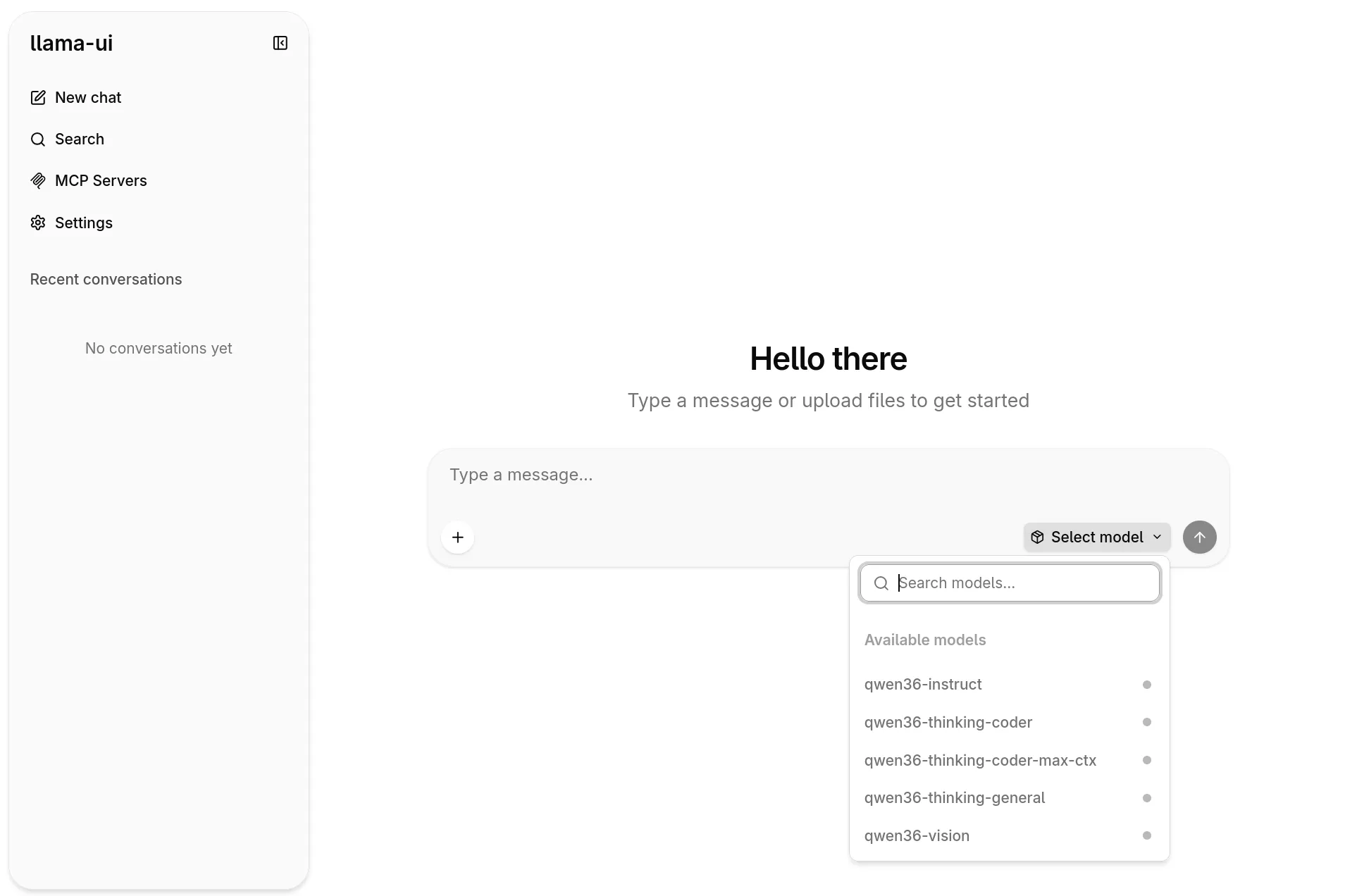
I asked “Write a tetris clone in a single html file” to qwen36-thinking-coder. The model processed the 20 tokens prompt in 0.2s (126.14 tokens/second) and generated a response in 2 min 48s, with a total of 5403 tokens and generation speed of 32.10 tokens/second. Here is the end result.
.
Moreover, other options to interact with llama.cpp are OpenWebUI, or directly via the API, with AI coding agents like OpenCode or Pi.
If you prefer to call the API directly, you can test the qwen36-instruct preset with a simple curl:
curl http://localhost:8080/v1/chat/completions \
  -H "Content-Type: application/json" \
  -d '{
    "model": "qwen36-instruct",
    "messages": [
      {"role": "user", "content": "Write the history of programming languages in one page."}
    ]
  }'
Caveats
- Router mode is experimental. The llama.cpp logs flag it explicitly: this is fine for local use, but not something to expose on a network.
- KV cache quantization trades accuracy for context. If you need a 128K window, expect some quality loss on long conversations.
- Flash Attention requires a GPU backend and sufficient VRAM. It won’t help if the model itself doesn’t fit.
What’s next
llama.cpp recently merged support for Multi-Token Prediction (MTP). Early benchmarks suggest up to 2x faster inference with MTP enabled - a follow-up post will benchmark it on and off using the same 24GB GPU setup.